

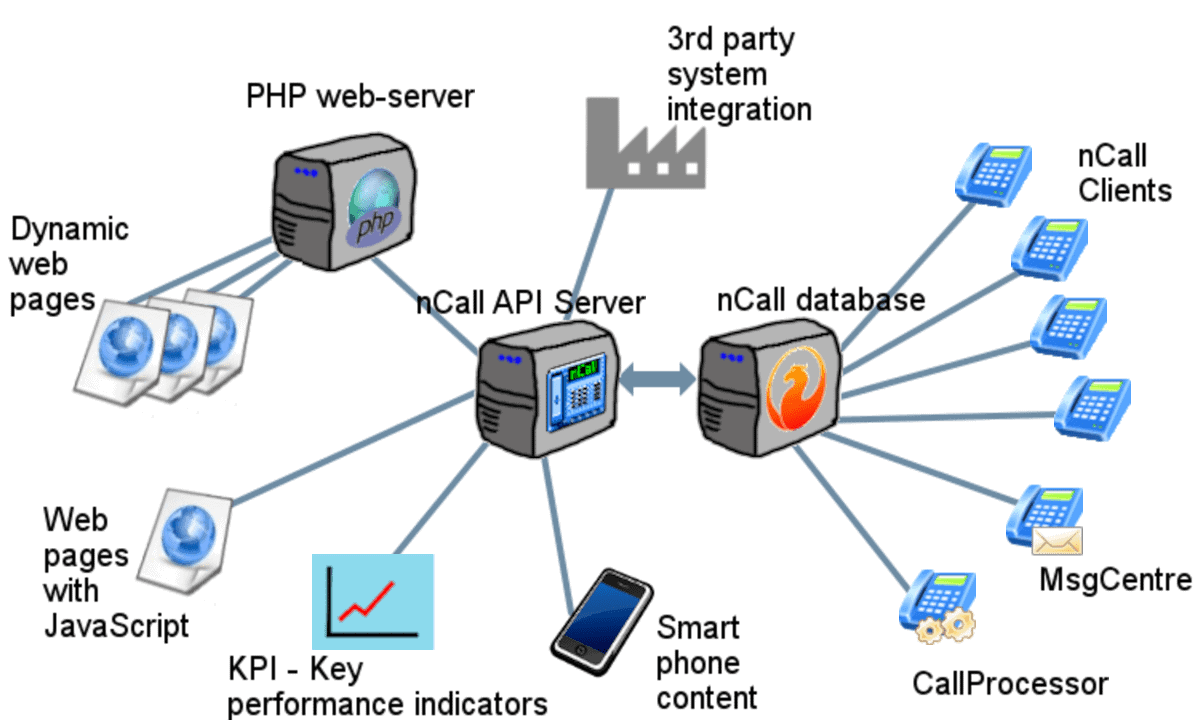
If you already use nCall to run your answering service, you will know how much important information lives inside it: clients, contacts, call instructions, call history, messages, reminders, tasks, telephone numbers, users and billing data. The nCall REST API Server is the optional module that allows other software to work with that information safely and automatically.
In plain English, it lets nCall talk to your website, client portal, CRM, billing system, reporting dashboard, spreadsheet process, or another customer’s system. It removes the need for a person to repeatedly copy information out of nCall, type information into nCall, or manually send updates between systems.
The API Server is mainly used by nSolve, your IT provider, or your web developer, but the benefits are very business-focused: less administration, better reporting, fewer mistakes, faster client service and more flexible services for your answering service customers.
What is a REST API?
A REST API is simply a structured way for one computer system to ask another computer system for information, or ask it to do something. Instead of opening the nCall desktop application and clicking through screens, a script or website sends a request to the API Server.
You can think of the API Server as a controlled doorway into nCall. A normal web server returns pages for people to read. The nCall API Server returns data for software to read. That data is returned in JSON format, which is a common format used by websites, apps and reporting tools.
For example, a request might mean:
- “Show me this client’s contacts.”
- “Give me all calls for this client between these two dates.”
- “Create a new client from this website sign-up form.”
- “Add a reminder for all operators.”
- “Tell another system when a new call or task is added.”
Why would an answering service use it?
The main reason is automation. Many answering services use nCall alongside other tools: websites, payment systems, accounting packages, CRMs, helpdesks, spreadsheets, dashboards and customer portals. Without an API, staff often become the bridge between those systems. They export, paste, retype, reconcile and check.
The API Server allows those systems to exchange information directly with nCall where it makes sense. Staff still use nCall as normal, but the repetitive background work can be handled by scripts and integrations.
Common business uses
Website sign-ups
A new customer completes a sign-up form on your website. The API can create the client in nCall, add the general contact, add useful contact details, allocate a telephone number, apply a billing scheme, set up default call handling and add message delivery settings. This reduces delay between sign-up and operational setup.
Live dashboards and wallboards
Managers can build dashboards that show call volume, answered calls, undelivered calls, message activity, operator sessions, active clients or other current workload indicators. Instead of waiting for a report to be produced, the dashboard can ask nCall for the latest figures.
Billing and profitability reports
The API can retrieve client billing information for a chosen period, including call counts, call duration, messages taken, extras, included and chargeable activity, and other billing values. This can help accounts teams, management reports or profitability checks.
CRM and helpdesk integration
An external CRM or helpdesk can search nCall for a client, contact or telephone number, then display the matching nCall information to your team. The integration can also create follow-up tasks or record information back into nCall if that is part of your workflow.
Tasks, to dos and reminders
A website form, scheduled script or external service can create nCall tasks, to dos or reminders. For example, a supervisor form could create reminders for selected users, or a client request form could create a follow-up task for the right team.
Webhooks and event-driven workflows
Webhooks allow nCall to call another system when selected events happen. For example, another system could be notified when clients, calls, messages, tasks or reminders change. This is useful when you want another service to react to nCall activity without constantly polling for updates.
What nCall information can be accessed?
The API Server exposes many familiar nCall areas as resources. The exact fields available depend on the resource, the API version and your permissions, but common areas include:
- CLIENTS: client/company records, status, type, billing details, custom form data and notes.
- CONTACTS: contact names, telephone numbers, email addresses, web access details, client links and contact status.
- CALLS: call records, call start and end times, caller details, contact and client links, operators, call notes and custom form values.
- MESSAGES: messages generated from calls, delivery information, message content and related call links.
- CALL_ACTIONS and MESSAGE_ACTIONS: call handling and message delivery instructions.
- TASKS, TODO and REMINDERS: operational follow-up work for users and teams.
- TELEPHONE_NUMBERS and TELEPHONE_NUMBERS_ALLOCATION: numbers and their client allocations.
- USERS and USER_SESSIONS: operator records and login session information.
- SCHEMES, BILLING_EXTRAS and BILLING_EXTRAS_LINK: billing schemes and additional chargeable items.
- WEBHOOKS and WEBHOOK_EVENTS: outbound webhook configuration and history.
The API also includes useful special functions such as finding records by text, finding clients or contacts by telephone number, checking web access credentials, retrieving client call statistics, and retrieving billing for a specific client and date range.
How does a request work?
An API request is usually made to a URL. The URL contains the server address, port, API version, the nCall area being accessed, and the requested output format.
A typical URL has this shape:
http://SERVER:PORT/v11/CONTACTS.jsonThe pieces mean:
SERVERis the computer running the nCall API Server.PORTis the configured API port, commonly 22005 unless your installation uses a different value.v11is the API version.CONTACTSis the nCall resource being requested..jsonasks the server to return JSON data.
In a real installation, the script also sends an nCall username and password. The API Server checks those credentials and applies the permissions for that user.
Reading data from nCall
Reading data is known as a GET request. For example, a developer could ask for a contact’s ID, first name, last name and mobile number:
http://SERVER:PORT/v11/CONTACTS/1763.json?output_fields=ID,Firstname,Lastname,MobileThe 1763 part is the nCall database ID for that contact. The output_fields part tells the API which fields should be returned. By asking only for the fields needed, integrations can keep responses smaller and clearer.
If the integration does not know the ID, it can search using field values:
http://SERVER:PORT/v11/CONTACTS.json?Firstname=Jean&Lastname=Barnet&output_fields=ID,Firstname,Lastname,MobileIt can also use broader searches, such as finding a matching telephone number or finding records that contain a particular word or email address.
Filtering and date ranges
Many useful reports need filters. For example, you may want calls for a client this month, messages for a date range, or contacts with a missing mobile number. The API supports filters in the URL.
A call report might request calls for a client after a certain date:
http://SERVER:PORT/v11/CALLS.json?ClientID=995&CallStart=greater_than_2026-07-01&output_fields=ID,CallStart,ContactID,CallerNumberThe API includes readable operators such as greater_than_, less_than_, not_equal_to_ and containing_. It also supports named dates such as today, yesterday, this_month, last_month and relative values such as now+10minutes.
Writing data to nCall
Where the API user has permission, an integration can also create, update or delete records. Developers normally describe these actions using HTTP method names:
- GET: read information from nCall.
- POST: create a new record, such as a client, contact, task or reminder.
- PUT: update an existing record.
- DELETE: delete a record where supported and permitted.
For example, a website sign-up integration might create a new CLIENTS record, then create or update related CONTACTS, CALL_ACTIONS, MESSAGE_ACTIONS and TELEPHONE_NUMBERS_ALLOCATION records. This is the kind of work a script can do consistently in the background.
Example workflow: new website sign-up
A practical new client sign-up workflow might look like this:
- The customer completes your website form.
- Your website validates the information and sends it to a secure server-side script.
- The script creates the client in nCall.
- The script finds or updates the client’s general contact.
- The script adds default call handling and message delivery instructions.
- The script allocates a telephone number if required.
- Your team can see the new client in nCall without retyping the form.
The exact steps depend on your business rules, but the important point is that the API allows nCall setup to become part of a controlled workflow rather than a manual handover.
Example workflow: billing report
For billing and management reporting, a script can ask nCall for a client’s bill over a specific period:
http://SERVER:PORT/v11/CLIENTS/807/billing.json?startdate=2026-06-01&enddate=2026-07-01That information can then be used in a spreadsheet, invoice process, profitability report or client activity report. A scheduled script could run this for many clients and produce a regular management file.
Authentication and permissions
The API Server uses nCall usernames and passwords. For most integrations, we recommend creating a dedicated nCall user for the API rather than using a real person’s day-to-day login. This makes it clearer which changes came from an integration and allows permissions to be controlled more carefully.
Access depends on the nCall role and your API configuration. A typical arrangement is:
- Admin: can read and write through the API.
- Supervisor: commonly has read-only access.
- User: commonly has no API access.
These defaults can be configured for your installation. For example, a reporting integration might only need read access, while a sign-up integration needs carefully controlled write access.
Where should the API Server be installed?
The API Server normally runs on or near the nCall server, connected to the same nCall database. It can listen on a configured port for API requests. The server also includes a basic web server that can host example scripts if required.
In most installations, the API should not simply be exposed directly to the public internet. Common safer approaches include keeping it on your local network, using a VPN, placing a controlled web application in front of it, using HTTPS, using firewall rules, and giving API users only the permissions they need.
nSolve can advise on the right deployment pattern for your environment.
What documentation is available?
The API Server can generate documentation for the endpoints available on the installed version. This includes the resources, fields, available actions and example URLs. The installed API Server also includes example scripts in common tools such as cURL, PHP, JavaScript using Node.js, Visual Basic and Python.
For developers, the live resource documentation is especially useful because it reflects the API version and fields available on that installation.
What skills are needed to use it?
Most nCall users do not need to work with the API directly. A manager or business owner normally defines the desired outcome, such as “let clients view their messages online” or “create a monthly billing dashboard”. A developer then turns that requirement into a script, website page or integration.
A developer working with the API should be comfortable with:
- HTTP requests and basic authentication;
- JSON data;
- server-side scripting in a language such as PHP, JavaScript, Python or Visual Basic;
- safe handling of usernames, passwords and client data;
- testing against a controlled nCall installation before going live.
Good projects to start with
If you are new to the nCall API Server, good first projects are usually focused and low risk:
- a read-only dashboard showing today’s call counts;
- a report of active clients and their key details;
- a client lookup by telephone number;
- a reminder creation form for internal staff;
- a monthly billing export for accounts;
- a read-only client portal page showing recent calls or messages.
Once those are working well, you can move on to more involved workflows such as full client sign-up automation or two-way client self-service.
Questions to ask before building an integration
- What exact problem are we trying to solve?
- Does the integration need to read from nCall, write to nCall, or both?
- Which clients, contacts, calls, messages or tasks should it be allowed to access?
- Which fields are required, and which should be hidden?
- Should the integration run live, on a schedule, or only when a user presses a button?
- Who should be alerted if the integration fails?
- What should happen if the external system sends incomplete or invalid information?
- How will the integration be tested before it touches live customer data?
Frequently asked questions
Do my operators need to use the API?
No. Operators continue using nCall normally. The API is normally used by websites, scripts, dashboards and other software in the background.
Can the API change live nCall data?
Yes, but only where the endpoint supports it and the API user has permission. Read-only integrations are also possible and are often the best starting point.
Can clients update their own details?
Yes, this can be built as part of a client portal. The portal should be designed carefully so each client can only access and update the information you choose to expose.
Can it be used for real-time reporting?
Yes. Dashboards can request current information from nCall, including call and message activity. The design should avoid unnecessary traffic by requesting only the fields and date ranges needed.
Can it integrate with Zapier, Make, CRMs or other cloud services?
Yes, in many cases. The exact design depends on whether the external service can call your API securely, whether you use a middleware script, and how your nCall server is protected.
Is it safe to expose the API to the internet?
We do not normally recommend exposing the API directly to the internet without additional protection. A controlled web application, VPN, firewall rules, HTTPS and carefully restricted API users are usually better options.
How to get started
Start with the business outcome rather than the technology. Decide what should be automated, what information should be displayed, who should be allowed to see or change it, and what success looks like.
From there, nSolve or your developer can map the required nCall resources and fields, configure a suitable API user, review the security approach, build the script or portal, and test it safely before going live.
Want to find out more about how the nCall REST API Server module can help your answering service? Get in touch and tell us what you would like nCall to connect to.


