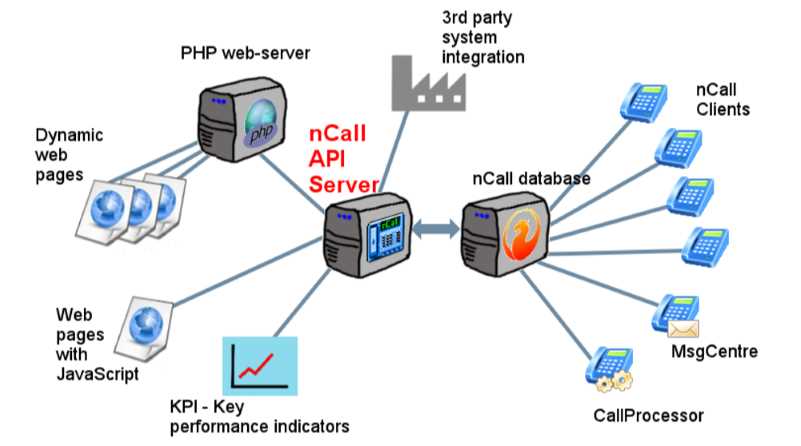
The nCall REST API Server is an optional nCall module that lets other software securely read from, and where appropriate write to, your nCall database. In practical terms, it is the bridge between nCall and the systems your answering service already uses: your website, client portal, CRM, billing system, reporting tools, dashboards, reminder tools, or a customer’s own software.
You do not need to be a programmer to benefit from it. The module is usually configured by nSolve, your IT provider, or your web developer. Once in place, it allows routine work that would normally involve copying, exporting, retyping, or emailing information to happen automatically.
The API Server exposes key areas of nCall, including clients, contacts, calls, messages, tasks, reminders, users, telephone numbers, billing information, call actions, message actions and webhooks. Your integration can then request just the information it needs, or create and update records where your nCall permissions allow it.
The API Server runs as a small web service connected to your nCall system. Instead of returning web pages for people to read, it returns structured data that another computer program can understand. The data is returned in JSON format, which is a common way for modern systems to exchange information.
A script, website, app or reporting tool sends a request to a special nCall address. The request might ask for information, such as “give me the calls for this client today”, or it might ask nCall to create or update something, such as “add this new contact”. The API Server checks the username, password and permissions, talks to the nCall database, and sends back the result.
For example, an integration could ask nCall for a contact’s first name, last name and mobile number, or ask for all calls for a client between two dates. It can also ask only for the fields it needs, which helps keep requests quick and tidy.
The API Server uses nCall usernames and passwords, so you can create a dedicated nCall user for integrations. Access can be limited by role: administrators can be given read and write access, supervisors are commonly read-only, and ordinary users can be blocked from API access unless you choose otherwise.
The server supports HTTP and HTTPS, and it is normally installed on your own network or placed behind a controlled web server rather than being openly exposed to the internet. nSolve can advise on the best arrangement for your installation.
The API Server includes generated documentation of the available endpoints, fields and examples from the server itself. Example scripts are available in common scripting tools such as JavaScript, PHP, Visual Basic, Python and cURL. These are intended to help your IT team or developer get started quickly, while still allowing bespoke workflows that match the way your answering service operates.
Common data areas include CLIENTS, CONTACTS, CALLS, MESSAGES, TASKS, TODO, REMINDERS, USERS, TELEPHONE_NUMBERS, SCHEMES, WEBHOOKS and WEBHOOK_EVENTS.
A typical project starts by deciding what you want to automate or display. For example: “new website sign-ups should create nCall clients”, “clients should see their messages online”, or “accounts need a monthly billing export”. From there, nSolve or your developer can map the required nCall fields, configure a secure API user, and build the script, portal page or report.
If you already have a developer, we can provide the technical documentation and example scripts. If you would prefer nSolve to create the integration, we can discuss your workflow and provide a quotation.
For more background, please read our blog post: What is the nCall REST API Server module for?
Please contact us for further information and/or a price quote.


© 2026 nSolve, Daws House, 33-35 Daws Lane, London, NW7 4SD, UK