


ChatJack – the AI receptionist built into nCall
ChatJack is an add-on for nCall that gives your answering service an AI receptionist working alongside your operators. It answers calls your phone system forwards to it, reads your client’s nCall notes, information sheets and contacts, and talks to the caller in a natural voice. It can take a message on your existing nCall form, transfer the caller to a client contact, or pass the call to one of your operators, and it saves the result into nCall like any other call.
For an nCall answering service it means extra capacity for peaks and out-of-hours calls, a new lower-cost AI service to offer clients, and no second system to learn. Your clients, forms, reporting and message delivery stay exactly where they are today.
Arrange a demo | See pricing | Frequently asked questions
See and hear ChatJack
Watch ChatJack answer an inbound call and complete a custom nCall form:

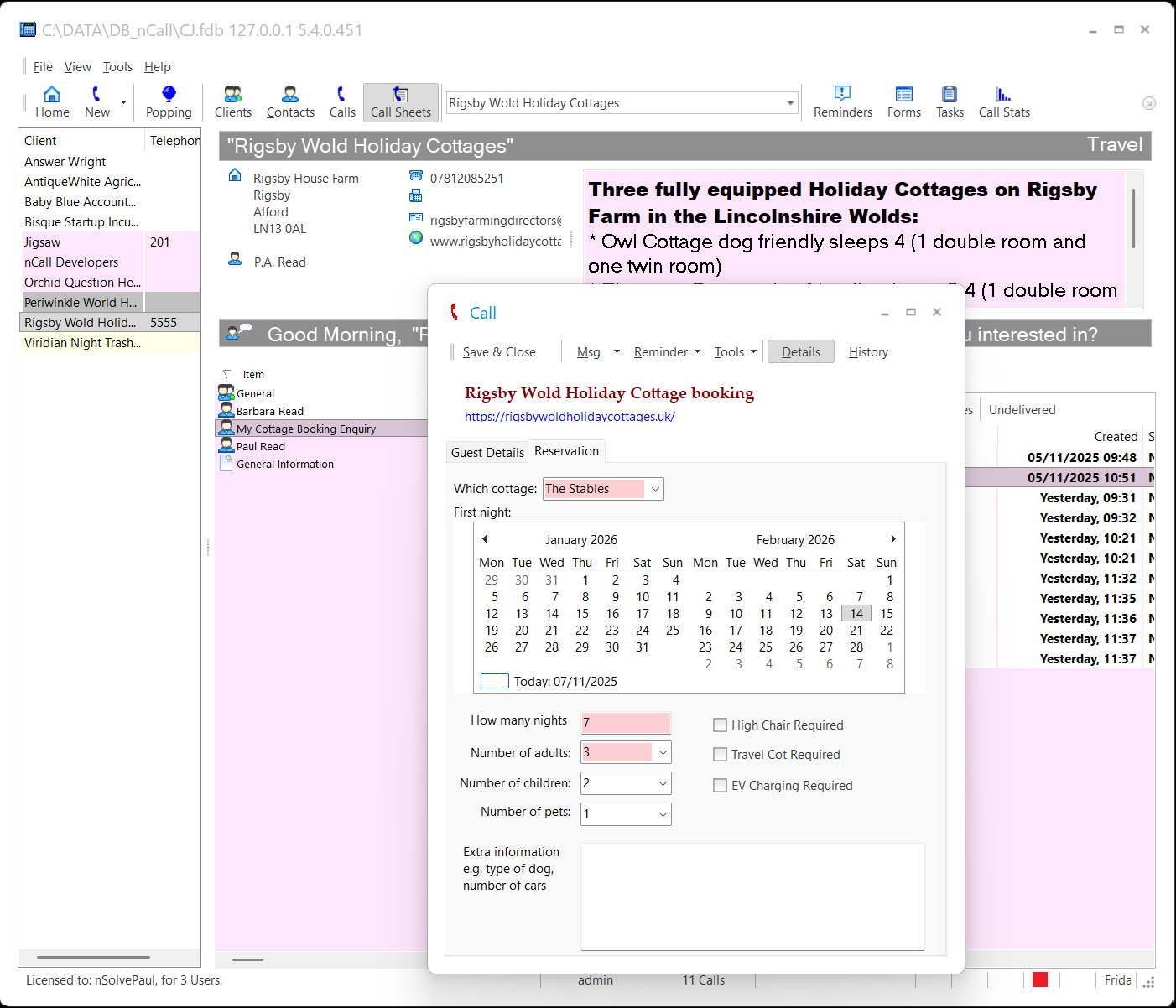
The booking enquiry below was taken entirely by ChatJack, talking with the caller and using the client information held in nCall. Listen to the call audio.
Why nCall answering services are adding ChatJack
- Cover peaks without overstaffing. Route calls to ChatJack after they have waited a set time, so a surge of calls does not become a queue of abandoned ones.
- Answer out of hours. Let ChatJack take the night, weekend and holiday calls that are expensive to staff and easy to miss.
- Sell a new service tier. Offer clients an AI answering package at a lower price point, or add AI overflow and 24/7 cover to existing packages. Every ChatJack call is logged in nCall, so you can bill it like any other call.
- Keep operators on the calls that matter. Routine message-taking goes to ChatJack, while calls that need judgement, reassurance or a sale still reach your team.
- No new platform. ChatJack reads your nCall set-up and writes back into it. There is no second client database to keep in step, no new message portal for your clients, and no change to how your operators work.
How it fits into your operation
- Your phone system decides which calls reach ChatJack. Calls go to a dedicated ChatJack extension on your PBX under the rules you set, such as after 30 seconds unanswered, outside office hours, or for particular DDIs/DIDs.
- ChatJack pops the client in nCall. Before it speaks, it loads the client’s notes, information sheets, instructions, contacts and their availability, message form and, where available, the caller’s recent call history, just as an operator’s screen pop does.
- It holds a natural conversation. It greets the caller in your client’s name, answers questions from the information you hold, and politely declines to guess when it doesn’t know the answer.
- It completes the call. It takes a message on your nCall form, transfers the caller to an available client contact, escalates to your operators, or ends the call once the caller’s needs are met.
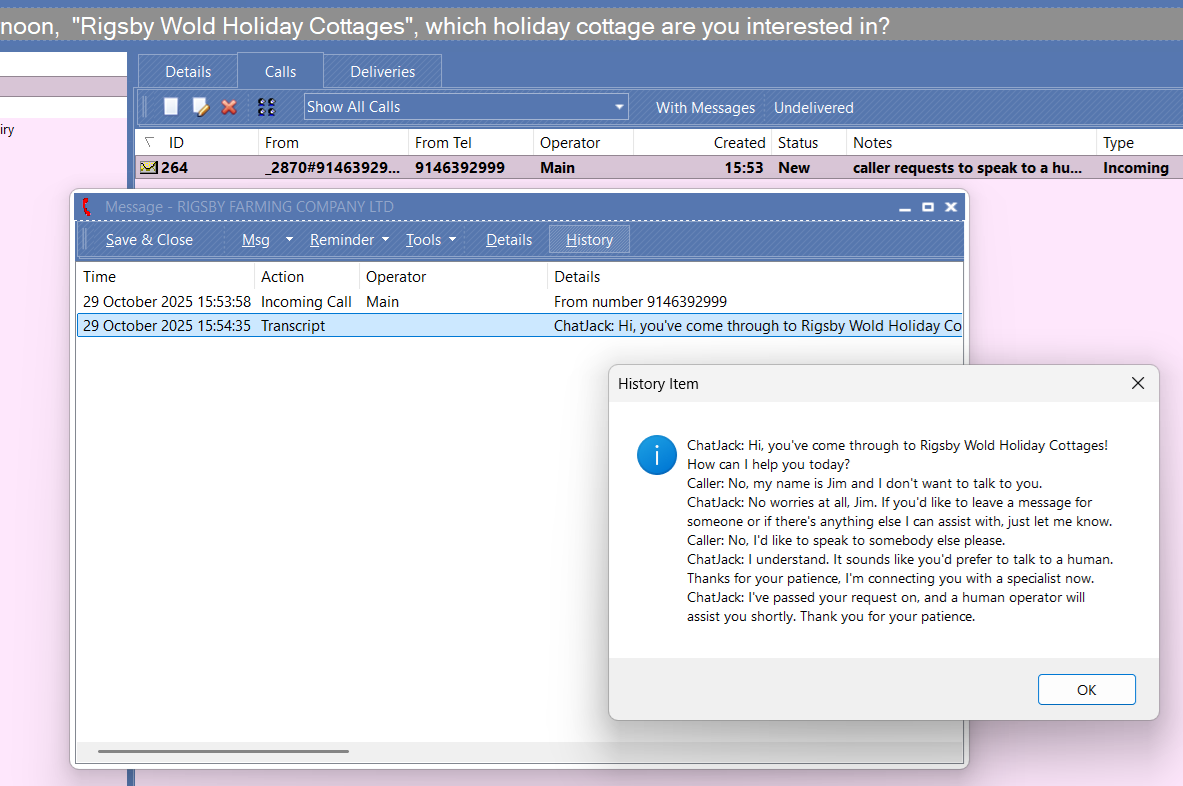
- It files the call in nCall. The call record, message, caller details, timings and a transcript are saved in nCall, so your normal message delivery, reporting and billing pick it up.
What ChatJack does today
Knows your clients the way your operators do
- Reads each client’s nCall notes and information sheets, so it can answer questions about the client’s services and opening hours.
- Recognises contacts and repeat callers, and can use the caller’s recent call history so returning callers aren’t treated as strangers.
- Follows client-specific instructions, and you can add extra rules for individual clients where needed.
Takes messages your way
- Uses your default nCall message form or your client’s custom forms. There is no separate AI script to maintain.
- You “train” it by giving form fields clear names and hints, which also helps new operators.
- Messages go through your normal nCall delivery, in the same format as operator-taken messages.
Hands over when it should
- Transfers callers to client contacts, using the contact availability already recorded in nCall.
- Escalates to your operators’ extension or group when the caller needs a person.
- Ends completed calls politely instead of leaving dead air.
Keeps nCall as the record of truth
- Each ChatJack call is saved in nCall with its outcome, notes, message content and caller details.
- Transcripts are saved with the call for review, quality checks and coaching.
- Calls can be saved as New for normal handling or as Draft, so a supervisor can review AI-taken messages before they are sent.
Lets supervisors see what is happening
- A secure web status page shows service health, live and recent calls, and each call’s outcome and cost.
- Each call has its own detail page with duration, outcome, cost and transcript, plus a one-click button to copy the transcript.
- Your ChatJack credit balance is shown on the same page, and you can top it up there.
Sounds right for your brand
- Choose from a list of approved natural voices, or rotate between several voices.
- Give ChatJack an operator name to introduce itself with. We recommend one that makes clear the caller is speaking to an AI assistant.
- Callers who clearly need another language can be handled in that language, 70 different languages are supported.
You stay in control
ChatJack only does what you set it up to do:
- Which calls: your PBX routing decides which calls ChatJack receives, and ChatJack can be set to stop accepting calls at any time.
- How many at once: ChatJack can handle several calls at the same time, up to a limit you set. Calls over that limit are declined rather than answered badly.
- Who it can hand calls to: automatic transfer to client contacts and escalation to your operators can each be turned on or off.
- What happens to its work: save ChatJack calls as Draft if you want a person to check them before messages go out.
- How it behaves: the overall instructions, voices and client-specific rules are all adjustable. nSolve provides a proven starting configuration.
Getting a client ready for ChatJack
Think of ChatJack as another highly intelligent operator in the next room, you just never see their face. Whatever helps your operators handle a client’s calls helps ChatJack too:
- Keep information sheets clear and current. ChatJack answers from what you hold and won’t invent answers, so good client information means better answers.
- Give custom form fields descriptive names and hints. For example, a field named Car_Model with the hint “Ask the caller for the make and model of the car” tells ChatJack exactly what to collect.
- Start with a few clients. Most services begin with overflow or out-of-hours calls for a handful of clients, review the transcripts, then widen use from there.
Pricing
ChatJack is priced so you can resell AI answering at a healthy margin, whether as overflow, out-of-hours cover, a lower-cost package or a full AI receptionist service.
- Time after the first 3 minutes is charged per second, not rounded up to the next minute.
- Calls that end within a few seconds with no input from the caller, such as wrong numbers, silent calls or hang-ups during the greeting, are charged at a reduced rate.
- Every call’s cost is shown on the status page, so you can see exactly what each call cost and pass it on to your clients.
Pay as you go
No minimum monthly spend. You pay only for the calls ChatJack answers. Calls are paid from prepaid credit held on your nSolve account (processed by Stripe). A small minimum credit is needed for ChatJack to answer calls, and you can top up from the ChatJack status page.
Subscriptions
Monthly plans with included minutes, for services with regular volumes, will be announced soon.
Setup
Setup and guidance are free during 2026 for customers with active nCall support. Gixo or your telecoms supplier may charge for configuring your phone system.
What you need
- An existing nCall system. ChatJack runs on top of your current nCall licence.
- A dedicated extension on your phone system that forwards the calls you choose to ChatJack’s secure voice service. If you are a Gixo customer, Gixo can set this up for you. Otherwise we will tell your telecoms supplier what is needed.
- A Windows server. This is usually your existing nCall server, where ChatJack runs as a Windows service alongside CallProcessor, MsgCentre and your other nCall services. It can run on a separate server if you prefer.
- Standard internet access and a TLS certificate for the ChatJack web connection. Your nCallHub certificate is often suitable.
nSolve installs ChatJack and provides the initial configuration, then helps you test it with your own clients before it takes live calls.
Secure and dependable
- Your data stays in nCall. Call records, messages and transcripts are saved in your own nCall database on your own server.
- Only genuine calls are answered. ChatJack checks that each incoming call notification is signed and recent before acting on it, and rejects everything else.
- Credentials are protected. Each installation has its own protected AI credential, keys and passwords are redacted from logs and status pages, and the status page requires an access token.
- Problems are visible. Configuration mistakes are caught when the service starts, not on a live call. Failed calls are reported on the status page and are not charged.
- European data residency. If your clients need it, calls can be routed through the AI provider’s EU voice endpoint.
Coming next
ChatJack is being developed actively, with regular releases. Work in progress includes:
- Connections to your clients’ systems, such as postcode and address lookup, practice management and calendars, so ChatJack can check details and bookings during the call. The groundwork is already in place, and early access is available on request.
- Appointment booking and rescheduling within each client’s rules and availability.
- Per-client escalation control, so escalation can be switched off for individual clients and you can sell an AI-only package that never uses operator time.
- Spam and nuisance call detection to keep capacity and cost focused on genuine callers.
- Sentiment and priority flags to highlight unhappy or urgent callers for follow-up.
- Daily usage summaries of call counts, outcomes and costs.
Frequently asked questions
What exactly is ChatJack?
ChatJack is an AI receptionist add-on for nCall. It answers calls forwarded to it, talks naturally with the caller using your nCall client information, takes messages on your nCall forms, transfers or escalates when needed, and saves every call back into nCall.
Does ChatJack replace our operators?
You decide which calls and clients it handles, and if it transfers or escalates whenever a call needs a person. Most services use it to absorb peaks and cover out-of-hours calls, so operators can focus on the calls that truly need a human.
Do we have to move away from nCall, or buy another nCall licence?
No to both. ChatJack runs on top of your existing nCall system and licence. It uses the client and caller information nCall already holds and writes its calls back into nCall, so your message delivery, reporting and client billing keep working as they do now.
How do we teach ChatJack about a client?
The same way you teach an operator. ChatJack reads the client’s notes, information sheets and instructions in nCall. For message-taking, it uses your custom form fields’ names and hints to work out what to ask. Clear, current client information and descriptive form hints make the biggest difference.
What if a caller asks something ChatJack doesn’t know?
ChatJack is instructed not to make things up. If the answer isn’t in the client’s information, it says so politely and offers to take a message or, where allowed, passes the caller to a person.
What happens if the caller needs a real person?
ChatJack can transfer the caller to an available client contact or escalate the call to your operators. You decide whether transfer and escalation are allowed.
Can we offer clients an AI-only package?
You can already offer AI answering at a lower price than operator answering, and every ChatJack call is logged in nCall so it can be billed separately. Today escalation is switched on or off for your whole ChatJack installation. Control per client, so one client’s calls never reach your operators while others’ can, is in development.
Can we check ChatJack’s messages before they go to the client?
Yes. ChatJack can save its calls in nCall as Draft rather than New. Draft calls don’t generate messages until someone changes them to New, so a supervisor can review them first. Many services use this for the first few weeks.
Can ChatJack handle more than one call at a time?
Yes. ChatJack can hold several conversations at once, up to a limit you set to suit your volumes and supervision. Calls beyond that limit are declined rather than answered badly, and your phone system can be set up to route them back to your team.
Can ChatJack speak other languages?
ChatJack answers in English by default. When a caller clearly needs another language, it can usually continue in that language, depending on what the underlying AI model supports. Tell us about your clients’ needs and we can advise.
How do we pay for calls?
Calls are paid from prepaid credit on your nSolve account (processed by Stripe). Keep this in credit for ChatJack to answer calls, and top up from the ChatJack status page whenever you need to.
What happens if we run out of credit?
ChatJack stops accepting new calls until credit is added, so those calls stay with your team rather than building up charges you haven’t funded. Your balance is always visible on the status page.
Will it work with our phone system?
ChatJack needs a dedicated extension that your phone system can forward calls to over a secure SIP connection. Most modern IP phone systems and SIP trunks can do this. If you are a Gixo customer, Gixo can configure it for you. Otherwise, tell us which phone system you use and we will advise.
Do we need new hardware?
Usually not. ChatJack normally runs as a Windows service on your existing nCall server, alongside your other nCall services. It can also run on a separate Windows server if you prefer.
Is it secure, and can we trust it with live calls?
ChatJack only acts on verified, signed call notifications, and it saves call data in your own nCall database. Each installation has its own protected AI credential, and secrets are redacted from logs and status pages. You control which calls it receives, how many at once, and what it can do with them.
How do we know the service is running properly?
The ChatJack status page shows service health, live and recent calls, each call’s outcome and cost, and your credit balance. Every call can be opened to see its duration and transcript. ChatJack calls are also in nCall, so you can report on them there.
How long does it take to get started?
Once your phone system extension is in place, nSolve installs and configures ChatJack for you. Setup and guidance are free during 2026 for customers with active nCall support. Most services start with a small number of clients, review the first calls, and then expand.
How do we get a demo or find out more?
Contact the nSolve team in the usual way. We will arrange a demo, ideally using one of your own clients’ set-ups, and talk through pricing for your operation.
Ready to try ChatJack?
Talk to the nSolve team in the usual way about a demo, pricing, or which of your clients would suit ChatJack best. We will help you plan a rollout that starts with a few clients and grows as you gain confidence.


