

Serviced offices, business centres and virtual office providers all sell something deceptively difficult: the feeling that every tenant has their own professional reception team.
That is easy when you have a handful of clients and a quiet phone. It becomes much harder when operators are handling calls for dozens or hundreds of businesses, each with its own greeting, contacts, escalation rules, opening hours, message preferences and billing arrangements.
This is where dedicated call answering software for serviced offices makes the difference. A general CRM, spreadsheet or shared inbox may help you store information, but it will not guide an operator through a live call in the same way as software built for telephone answering services and virtual receptions.
nCall answering service software is designed for exactly this kind of operation: professional call answering, virtual reception, message taking, transfer handling, reporting and client billing across many different client accounts.
Why serviced offices need specialist call answering software
A serviced office reception is not answering calls for one company. It is answering on behalf of many companies, often with very different expectations.
One client may want every call transferred to a mobile. Another may want messages emailed to a team address. Another may need a structured enquiry form completed. Another may have priority contacts, private instructions, temporary holiday cover, or different greetings depending on the number dialled.
The operator needs all of that information immediately. They should not be searching through notes while the caller waits. They should be able to answer confidently, follow the right instructions, capture the right details and move cleanly to the next call.
For serviced offices, the right software supports three things at once:
- Professional caller experience – each caller hears the correct greeting and feels they have reached the business they intended to call.
- Operator efficiency – reception staff can see the right client information, contacts and call handling actions as soon as the call arrives.
- Commercial control – management can report on call volumes, handling time, chargeable activity and client usage.
What to look for in call answering software for serviced offices
1. Instant client information when the phone rings
In a shared reception environment, speed matters. Operators need to know which client the caller is trying to reach before they speak.
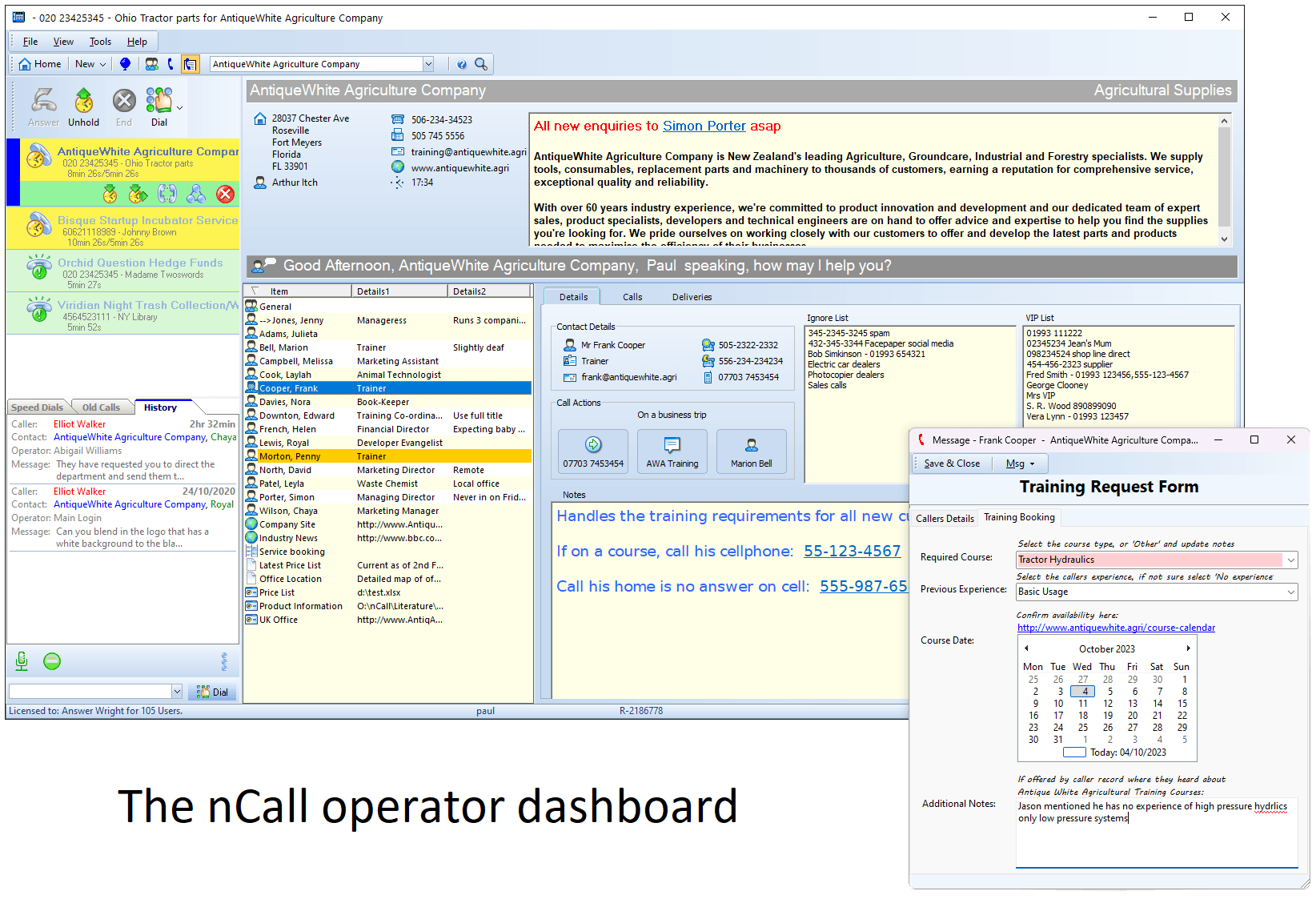
nCall supports client popping, so the relevant client record appears for the operator when an inbound call is received. This gives the operator access to the client greeting, notes, contacts and call handling information without having to manually search first.
For a serviced office, that can help operators answer naturally on behalf of each tenant rather than sounding like a generic call centre.
2. Unique greetings and instructions for each client
A serviced office may answer for accountants, consultants, property firms, trades, healthcare providers, agencies and start-ups all from the same reception team. Each client expects the call to be handled in its own voice.
Your software should let you store client-specific greetings, instructions and private information. It should also support different contacts and actions for each client, so operators are not relying on memory or outdated printed notes.
nCall allows unique settings for each client and contact, including configurable greetings and client notes. That is particularly useful when a serviced office needs to provide a polished service across a varied client base.
3. Contact-level call handling
Most calls are not simply answered and ended. The operator may need to transfer the caller, take a message, offer an alternative contact, follow a status instruction, or complete a specific form.
Good call answering software should show the operator the relevant call handling options for the selected contact or resource. That keeps call handling consistent even when operators are new, busy or working remotely.
With nCall, operators can select the relevant contact or resource and see programmed actions such as transfer options, message forms or alternative contacts.
4. Flexible message taking forms
Serviced offices often handle a wide range of call types. A simple name-and-number message is not enough for every client.
Some tenants may need enquiry details, booking information, support notes, order information, appointment requests or emergency contact details. If the form is too rigid, the operator sounds scripted. If there is no structure, important information gets missed.
nCall includes a custom form designer for message taking. This allows forms to be tailored to the client or enquiry type, helping operators gather the information that matters while still keeping the conversation natural.
5. Message delivery that matches each client
One client wants email. Another wants SMS. Another wants secure online messages. Another may want information pushed into a third-party workflow.
Call answering software for serviced offices should not force every tenant into the same delivery method. It should allow message preferences to be configured per client or contact.
nCall supports multiple message delivery methods including email, SMS, fax, secure online messages through the nCallOnline portal, and third-party systems via web message actions.
6. Support for billing and client reporting
Call answering is not only an operational service. It is a billable service.
Serviced offices may charge by call, by minute, by message, by package allowance, or through a wider office service plan. Without clear reporting, it is difficult to understand which clients are profitable, which clients are exceeding allowances, and how operator time is being used.
nCall automatically logs calls for billing reports and supports different billing schemes and charges. It also includes reporting and statistical analysis so managers can review activity by client, operator and period.
7. Scalability for local and remote operators
Some serviced offices handle calls from one front desk. Others use a team across multiple locations, remote workers or overflow staff.
The software should support the way your operation is staffed today and the way it may grow tomorrow. nCall supports local or remote operators and is scalable from a single operator through to larger teams.
8. Integration with your phone system
Reception teams should not have to fight their phone system. The call answering software should fit around your telecoms setup and make common call actions straightforward.
nCall integrates with VoIP/SIP and TAPI based phone systems, enabling call handling actions such as answer, hold, transfer and conference from within the operator dashboard, depending on the phone system in use.
Common signs your serviced office has outgrown spreadsheets
Many serviced offices start with shared documents, spreadsheets or a basic CRM. That can be enough at the very beginning. The cracks usually appear gradually.
- Operators are searching multiple places while calls are live.
- New staff take too long to train because the process depends on memory.
- Client instructions are duplicated, inconsistent or out of date.
- Messages are missed, delayed or sent through the wrong channel.
- Billing reports take too long to prepare.
- Managers cannot easily see call volumes or handling time by client.
- Remote operators cannot work with the same confidence as office-based staff.
If those issues sound familiar, the problem may not be your team. It may be that your tools were never designed for multi-client call answering.
How nCall helps serviced offices deliver a better reception service
nCall brings the key parts of a professional telephone answering operation into one operator dashboard. When a call comes in, the operator can see the relevant client record, greeting, contacts, notes and call handling actions. They can transfer the call, take a structured message, use a custom form and let nCall handle message delivery according to the client or contact preferences.
For managers, nCall adds the operational controls that serviced offices need as the service grows: call logging, billing support, reporting, client-level settings, user role protected administration and optional modules such as a branded client portal and REST API.
For operators, the benefit is focus. The right information is presented at the right moment, so they can sound professional on behalf of every client, even when the call volume rises.
Choosing software for a serviced office call answering service
When comparing call answering software, it is worth asking practical questions:
- Can operators see the correct client details automatically when a call arrives?
- Can each client have its own greeting, notes, contacts and handling instructions?
- Can message forms be customised for different clients or enquiry types?
- Can messages be delivered by the method each client prefers?
- Can the system support billing reports and different charging models?
- Can it support local and remote operators?
- Will it work with your current or planned phone system?
- Is training and support included so your team can get value quickly?
Those questions matter because the software will sit at the heart of your client experience. It is the difference between simply answering the phone and providing a reception service that feels tailored, controlled and commercially measurable.
nCall: call answering software built for multi-client operations
Serviced offices need call answering software that can keep pace with a multi-client reception environment. nCall has been developed for telephone answering services, virtual receptions and business centres, with features that support professional call handling, message taking, delivery, reporting and billing.
If you are reviewing call answering software for serviced offices, nCall is built to help your operators answer confidently, your clients receive accurate messages, and your management team understand the performance of the service.
Learn more about nCall answering service software
FAQs about call answering software for serviced offices
What is call answering software for serviced offices?
Call answering software for serviced offices helps reception teams answer calls on behalf of multiple client businesses. It stores client greetings, contacts, call handling instructions, message preferences and reporting information so operators can provide a professional service for each tenant.
Why not use a spreadsheet for serviced office call answering?
Spreadsheets can work for very small operations, but they are not designed for live call handling. Dedicated software can present the correct client details when the phone rings, guide operators through contact actions and support message delivery, reporting and billing.
Can nCall support remote operators?
Yes. nCall supports local and remote operators, allowing serviced offices and telephone answering teams to build a more flexible operating model.
Can nCall help with client billing?
Yes. nCall automatically logs calls for billing reports and supports different billing schemes and charges, which can help serviced offices manage call answering as a billable client service.


